
Create Strong, Secure Passwords Instantly
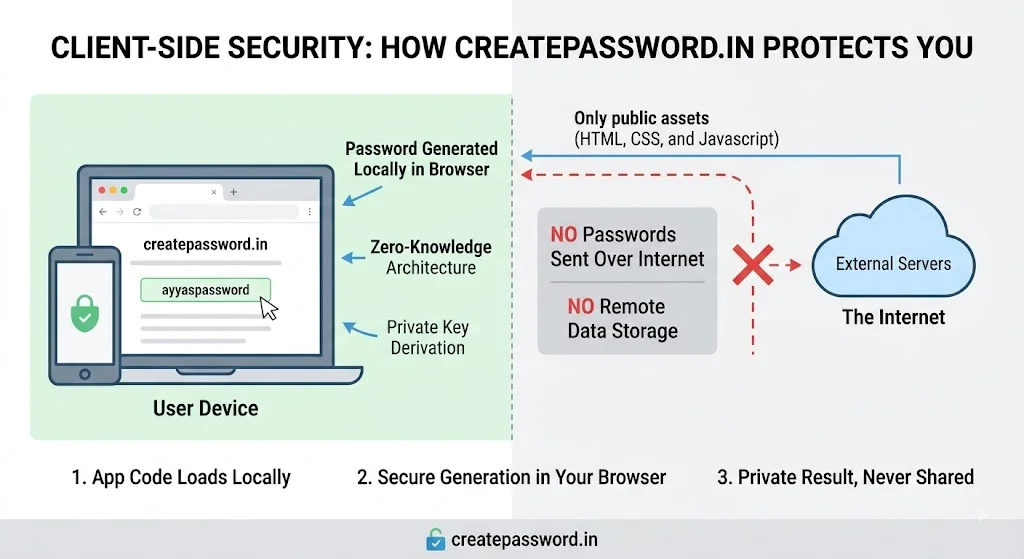
Create password online for free using 100% client-side browser cryptography — your credentials are never sent to any server. Whether you need to create a password instantly or work offline, our generator runs entirely in your browser and delivers cryptographically safe results in milliseconds.
Create Password Free — Customize & Generate
Set your desired length and character options below. We recommend at least 16 characters for everyday accounts and 24+ for critical credentials.
Password generator
103 bits of entropyWe recommend 16+ for everyday accounts and 24+ for critical credentials.
Character types
Strength here is based on entropy (length × character-set size). It does not measure uniqueness or whether the password was leaked — pair it with a breach check and use a unique password per account.
Generated locally with crypto.getRandomValues(). Nothing is sent to a server.
Why You Should Create Passwords Client-Side (100% Offline Privacy)
Most people don't realize that many online password generators secretly transmit your new credentials to a remote server for logging or analytics purposes. If a server ever stores the password you just generated, that credential is permanently compromised — even before you use it. This is why it's critical to create password online only through a tool that guarantees zero server contact.
Our generator uses the browser's built-in Web Crypto API (specifically crypto.getRandomValues()), which produces cryptographically secure random numbers entirely within your device. No network request is ever made to generate a password. You can confirm this yourself: open your browser's DevTools Network tab while generating passwords — you'll see zero outbound calls.
This architecture means you can create password without server storage by design, not just by policy. The tool works equally well offline — once the page has loaded, you can disconnect your Wi-Fi completely and continue to create random passwords locally. Your credentials exist only on your screen and nowhere else.
- Zero network requests during generation — verifiable in browser DevTools
- Continues to work after Wi-Fi is disconnected — true offline capability
- Powered by Web Crypto API — the same cryptographic standard used by banks
- No account, no sign-up, no tracking — completely free and anonymous
What Makes a Password Uncrackable in 2026?
Password security is a mathematical problem. Every credential has a measurable property called entropy — a number that represents how many possible combinations an attacker must try before guessing it. To create a secure password, you need to maximize entropy through two factors: length and character variety.
When you create a strong password using all available character types (uppercase, lowercase, digits, symbols), each character position has up to 95 possible values. A 16-character password drawn from this pool has approximately 95^16 possible combinations — a number with 31 digits. Even a botnet capable of one trillion guesses per second would take billions of years to exhaust those combinations.
Weak Password Examples
- ✗ password123 — cracked instantly
- ✗ Summer2024! — cracked in seconds
- ✗ qwerty@gmail — cracked in minutes
Strong Password Examples
- ✓ K#9mLpQ2!rXvN7sA — billions of years
- ✓ zT6$wRj!4Ym2@PnE — billions of years
- ✓ Hc8@vNq!3KxWs5mZ — billions of years
Randomness is equally critical — a long password built from patterns (like "Passw0rd!!!!!!!!") is still vulnerable because attackers use rule-based cracking that applies common transformations. Only a truly random sequence, such as those produced by a client-side password generator, achieves genuine uncrackability.
How to Create a Password Step-by-Step
Choose Your Length (Minimum 16 Characters)
Length is the single most important factor when you create a password. Start at 16 characters for standard online accounts. For email, banking, or your password manager's master key — the accounts that unlock everything else — set the length to 24 or 32 characters. Never go below 12 for any account that matters.
Enable All Character Types
To create a strong password with maximum entropy, select all available character sets: uppercase letters (A–Z), lowercase letters (a–z), numbers (0–9), and special symbols (!@#$%^&*). Each additional character type multiplies the number of possible combinations exponentially.
Generate and Check Strength
Click generate and review the strength indicator. A well-configured 16+ character password should display as "Very Strong." If any result looks pattern-like (repeating characters, obvious sequences), simply click generate again — the randomness ensures each result is independent and unique.
Copy and Store in a Password Manager
Never try to memorize a randomly generated password — that's the wrong tool for memory. Use the copy button to transfer your new credential directly into a trusted password manager (Bitwarden, 1Password, Dashlane, or KeePass). The password manager will remember it securely so you never need to type it manually.
Enable Multi-Factor Authentication
A strong password is your first line of defense; MFA is your second. After you create a password and add it to your manager, immediately enable MFA on the account (preferably using an authenticator app like Google Authenticator or Authy rather than SMS). With both in place, your account becomes extraordinarily difficult to compromise — even if your password is leaked in a third-party breach.
Create a Unique Password for Every Account
Password reuse is the most dangerous habit in digital security. When you create password credentials, generate a brand new one for every account — no exceptions. Our tool makes this effortless: click generate, copy, paste. If a website is ever breached, attackers will immediately test your reused password across hundreds of other services. Unique passwords eliminate that entire attack vector.
Web Crypto API
Powered by the same cryptographic standard used by banks and government systems.
Zero Server Contact
No network request is made during generation. Create password without server storage.
Instant Generation
Create password instantly in milliseconds. No waiting, no loading screens.
Works Offline
Create a client-side password with no internet. Disconnect Wi-Fi and generate freely.
Frequently Asked Questions
Everything you need to know about how to create a strong password safely and effectively.
Related Security Tools & Guides
Passphrase Generator
Need something memorable? Create a passphrase — a sequence of random words that is both secure and human-readable, ideal for master passwords.
Generate a passphrase →Password Strength Checker
Already have a password? Test it against real-world attack models to understand exactly how long it would take to crack.
Check password strength →Data Breach Checker
Before you create new passwords, find out if your email address has appeared in any known data breaches.
Check for breaches →Password Best Practices Guide
Read our comprehensive 2026 guide to password security covering NIST guidelines, MFA, and enterprise policy frameworks.
Read the guide →