
Privacy-first · Client-side generation

Free Password Generator & Online password Creator

CreatePassword is a free suite of browser-based security tools: generate strong passwords and passphrases with your device's CSPRNG, check strength, and screen passwords against known breaches without sending the password itself.

View All Tools
Why CreatePassword.in

Generate Strong, Secure Passwords Instantly

Welcome to CreatePassword.in, your trusted tool for generating highly secure, random passwords. In today’s digital landscape, protecting your online accounts is more critical than ever. Hackers use advanced brute-force and dictionary attacks to crack weak passwords in seconds. The best defense is a complex, unpredictable password—and that’s exactly what our free tool provides.

Why Use a Password Generator?

Human beings are naturally predictable. When creating our own passwords, we tend to rely on memorable dates, pet names, or simple keyboard patterns. Unfortunately, these are the first things cybercriminals test. A robust password generator eliminates human bias by using cryptographic algorithms to string together truly random combinations of letters, numbers, and symbols.

How to Use CreatePassword.in

Our tool is designed for speed and security:

1

Choose your length

Security experts recommend a minimum of 12–16 characters for critical accounts. Learn why 16 characters is the 2026 standard.

2

Select your characters

Toggle uppercase letters, lowercase letters, numbers, and special symbols based on your website's requirements.

3

Generate and copy

Click the generate button to create a unique password instantly on your device. We do not store or transmit your generated passwords to our servers, ensuring total privacy.

Best Practices for Online Security

  • Never reuse passwords

    Use a unique password for every single account. If one site suffers a data breach, your other accounts remain safe. Read our strong password guide.

  • Use a Password Manager

    Since memorizing dozens of 16-character random passwords is impossible, store the passwords generated here in a reputable, encrypted password manager. See our free password generator guide.

  • Enable Two-Factor Authentication (2FA)

    Always add an extra layer of security where supported. Explore our security tutorials.

Security & Developer Tools

Select a module below to launch the password creator, analyze strength, or run cryptographic hashes.

Password generator

103 bits of entropy
16

We recommend 16+ for everyday accounts and 24+ for critical credentials.

Character types

Generate a password
StrengthNone

Strength here is based on entropy (length × character-set size). It does not measure uniqueness or whether the password was leaked — pair it with a breach check and use a unique password per account.

Generated locally with crypto.getRandomValues(). Nothing is sent to a server.

How this generator works

When you click Generate, the tool asks your browser for cryptographically strong random bytes using the Web Crypto API — specifically window.crypto.getRandomValues(). This is the same source of randomness your browser relies on for TLS handshakes and other security-critical operations, and it is far more unpredictable than Math.random(), which was never designed for secrets.

The generator maps those random bytes onto the character set you selected (uppercase, lowercase, digits, symbols) at the length you chose. Every character is drawn independently from that pool, so each position is equally likely to be any allowed character. That uniform randomness is what makes the output resistant to guessing: an attacker cannot exploit patterns because there are none.

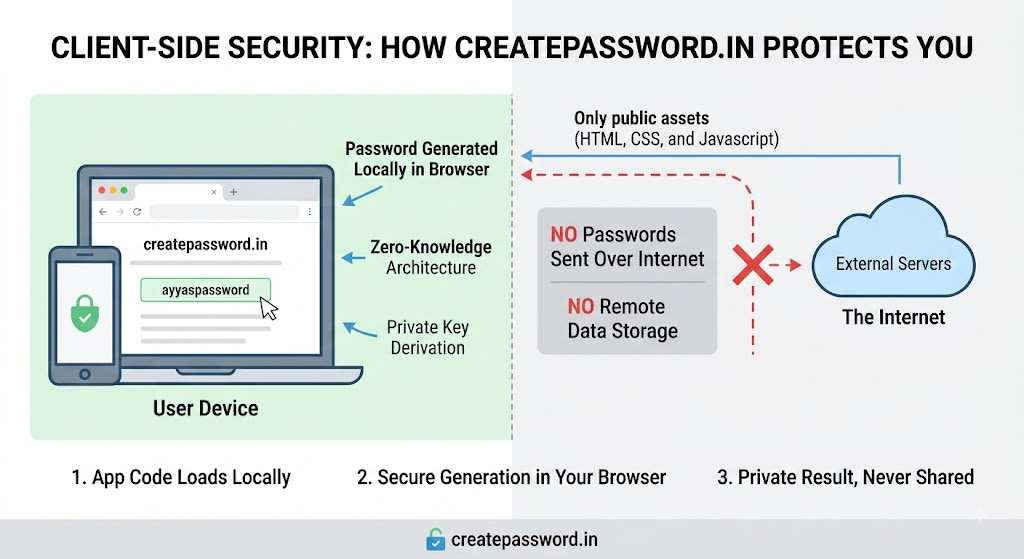
All of this happens locally, inside your browser. The generated password is never sent to createpassword.in, never written to a database, and never recorded in a log. There is no server-side generation step — the page you are looking at is the entire engine. When you copy the result, it goes straight to your device clipboard; when you close or refresh the tab, the value is gone from memory. On a shared computer, clear the field and the clipboard when you are done.

Verify it yourself

You do not have to take our word for it. You can watch the network traffic yourself and confirm that generating a password produces zero requests. It takes about thirty seconds.

  1. Open your browser’s developer tools. In Chrome, Edge, or Firefox, press F12 or Ctrl+Shift+I (Cmd+Option+I on Mac).
  2. Select the Network tab. If it already has entries, click the clear icon so the list is empty.
  3. Make sure the network log is recording (the red circle is “on”) and that “Preserve log” is optional here.
  4. Scroll up to the generator above and click Generate several times, change the length, and toggle character sets.
  5. Watch the Network list. No new requests to createpassword.in appear while you generate. The password is built entirely on your device.

The only tool on this site that makes a network call is the Password Breach Checker, and even that one never sends your password: it sends only the first five characters of a SHA-1 hash prefix to the Pwned Passwords API and matches the rest locally. For the generator itself, the Network tab stays quiet.

Password vs. passphrase — which to use

A password is a relatively short, dense string of random characters — letters, digits, and symbols jumbled together. A passphrase is a sequence of several random words, like river-lantern-quartz-drift. Both can be secure; the difference is how they get their entropy and how humans handle them.

A password gets its strength from a large character pool packed into a short length. It is ideal when a site caps the input length or when you will store it in a password manager and never type it by hand. The downside is that random symbol soup is essentially impossible to memorize, so reusing it or writing it on a sticky note becomes tempting — both of which defeat the purpose.

A passphrase gets its strength from length rather than per-character complexity. Four to six randomly chosen words can provide entropy comparable to or greater than a complex 12-character password, while being far easier to picture and remember. That makes passphrases a strong choice for things you must recall without a manager: a device unlock code, a disk-encryption password, or the master password that unlocks your password vault.

The practical rule: use a password from our password generator for ordinary accounts you keep in a manager, and use a passphrase from our passphrase generator for the few secrets you need to memorize. Either way, keep each one unique and turn on multi-factor authentication wherever it is offered. You can check any candidate against known breaches with our breach checker.

Frequently Asked Questions

Get password-security tips in your inbox

Join our newsletter for practical security guidance, new tool announcements, and breach alerts. No spam — unsubscribe anytime.

Your email is stored securely and never shared with third parties.

Frequently Asked Questions

Password Generator FAQs

Answers to the most common questions about creating strong, secure passwords.

Looking for more answers? View our full FAQ page.

Privacy Architecture

Client-Side Security: How createpassword.in Protects You

Client-side security diagram: passwords generated locally in the browser; app code loads from the internet; generation stays on device; breach checks use hash-prefix k-anonymity only.
Diagram of createpassword.in client-side security model showing local password generation and no remote storage.

Our Mission: Elevating Cybersecurity Hygiene

Security infrastructure fails when it is overly complex or hidden behind paywalls. The mission of createpassword.in is to promote baseline cybersecurity hygiene by providing accessible, professional-grade cryptographic tools to everyone. Whether you are configuring server environments or securing personal accounts, we believe robust digital security is a fundamental necessity, not a premium feature.

Privacy-first tool design

CreatePassword is built so generation and analysis happen on your device whenever possible.

When you create a password or passphrase, randomness comes from your browser environment—not from a remote generator that would need to see the result. Practical implications:

  • Local generation

    Password, passphrase, hash, UUID, API key, and QR tools run in your browser with Web Crypto or equivalent client libraries. Generated secrets are not uploaded to createpassword.in for storage.

  • No password vault on our servers

    We do not operate a cloud password database of credentials you generate. What you create stays under your control unless you copy it elsewhere.

  • Honest network boundaries

    Most tools need no outbound API. The Password Breach Checker sends only a five-character SHA-1 hash prefix to Have I Been Pwned (k-anonymity)—never the password or full hash.

Frictionless and Unmonitored

Core tools do not require an account. You can generate and check credentials immediately. Like most free sites, standard web analytics or advertising scripts may load on some pages; they are not used to collect the passwords you type into generators. Prefer a private window if you need maximum session isolation.

Standards-Compliant and Performant

We design our utilities around established cryptographic best practices, including adherence to NIST standards for password entropy and secure generation protocols.

The tools use the browser Web Crypto API and established generation practices, so the platform stays lightweight. Because the logic runs in your client, the core generation tools resolve quickly and work offline when your browser supports it — including in disconnected environments.

Built for a safer web. We are committed to keeping these tools free, fast, and honest — describing only what the code actually does.