

A data breach notification means your credentials are already moving through illicit marketplaces. Hackers automate their attacks, so a leaked email and password combination can be tested against thousands of sites within seconds of the dump going live. What you do in the first hour matters more than what you do over the following week.
This checklist walks through the exact sequence to lock down your digital identity after a leak, then explains the reasoning behind each step: why credential stuffing and AI brute-forcing have changed the threat model, why password reuse is the single most dangerous habit, how to generate and store credentials safely, and how MFA closes the remaining gap.
The 10-Step Data Breach Recovery Checklist
Act instantly when a company notifies you of a data leak. Follow this exact sequence to lock down your digital identity.
- Isolate the compromised account. Log into the breached service immediately. Do not use a link from the notification email, which could be phishing. Type the URL manually and lock the account.
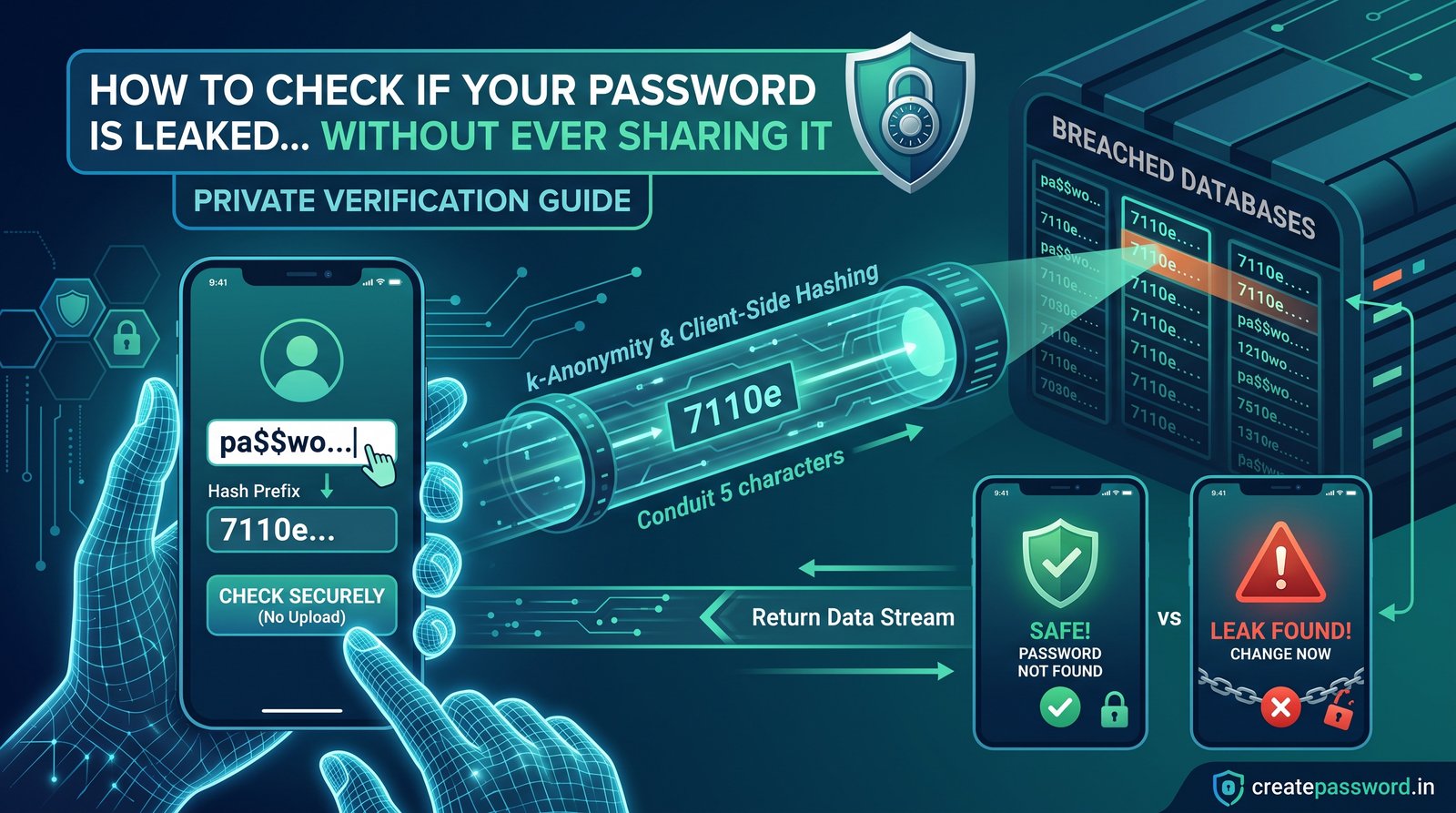
- Run a global breach scan. Check if your email or phone number appears in other recent dark web dumps. Scan your email now with the Password Breach Checker.
- Identify reused passwords. List every single website where you used the compromised password. These accounts are now actively vulnerable to credential stuffing.
- Deauthorize active sessions. Go into the security settings of your email, bank, and social media accounts. Click "Sign out of all devices" to kick out lurking attackers.
- Create password replacements. Generate completely new, randomized strings for every affected account. Generate secure credentials with the Create Password generator.
- Migrate to a password manager. Stop trying to memorize credentials. Move your newly generated logins into an encrypted, zero-knowledge vault.
- Enable hardware or app-based MFA. Turn on multi-factor authentication. Avoid SMS text messages; use a dedicated authenticator app or a FIDO2 hardware key.
- Freeze financial assets. If the breach included personal identifiers (SSN, PAN, government IDs), contact major credit bureaus to place an immediate fraud alert and credit freeze.
- Verify software downloads. If the breach involved malware on your machine, download fresh security tools. Always verify their authenticity using a SHA-256 hash. Learn about hashing with the Checksum Verification tool.
- Monitor for phishing follow-ups. Hackers use leaked data (like your name and phone number) to craft highly targeted scam emails in the weeks following a breach. Ignore unsolicited password reset requests.
What Is the State of Cybersecurity in 2026?
Hackers no longer execute manual attacks. They rely on artificial intelligence, machine learning frameworks, and massive graphics card (GPU) clusters to compromise accounts at scale.
Credential stuffing runs on automation
Cybercriminals exploit a method called credential stuffing. When a website suffers a data breach, hackers buy the leaked database on the dark web. They load millions of stolen email and password combinations into automated botnets. These scripts test your leaked credentials against thousands of banking, retail, and enterprise platforms simultaneously. Because humans predictably reuse passwords, credential stuffing has an incredibly high success rate.
AI brute-forcing accelerates the threat
AI brute-forcing accelerates this threat. Neural networks now analyze billions of leaked passwords to understand human psychology. The AI knows exactly how you swap letters for numbers. It predicts that you replace "a" with "@", "e" with "3", and append the current year to the end of a root word.
Standard complexity rules (requiring one uppercase letter and one number) fail against these neural networks. You must rely on pure mathematical length and cryptographic randomness to survive modern attacks.
| Password structure | Length | 2020 cracking time | 2026 cracking time (AI) |
|---|---|---|---|
| Word + Number + Symbol (P@ssword2026) | 12 chars | 2 weeks | 1 hour |
| Random letters (lowercase) | 12 chars | 3 years | 2 days |
| Random complex (generated) | 16 chars | 2 trillion years | 400 billion years |
| Diceware passphrase (6 words) | 30+ chars | Uncrackable | Uncrackable |
Cracking estimates compare password structures under 2020 hardware and 2026 AI-assisted hardware. Figures reflect relative difficulty, not a guarantee for any individual account.
Why Must You Never Reuse a Password?
Reusing passwords creates a devastating domino effect. When you reuse credentials, a security flaw at a minor website instantly compromises your highest-value assets.
Imagine you use the same password for a local hobby forum and your primary email inbox. The forum administrator fails to update their database security. Hackers breach the forum, extract the data in plain text, and feed it into their credential stuffing software. Within seconds, the automated script tests that exact email and password combination on your email provider.
The anatomy of an account takeover
- Initial entry: Attackers access your primary email inbox.
- The lockout: They instantly change the email account password, locking you out.
- Password resets: They visit your bank, crypto exchange, and social media accounts, clicking "Forgot Password."
- Financial drain: The reset links go directly to the inbox they now control. They reset your banking passwords and drain your funds.
To stop this sequence, you must isolate your risk. Create password uniqueness for every single login. Zero exceptions. If a minor app suffers a breach, the hackers only get a useless, isolated string of characters. Your email, financial portfolios, and enterprise data environments remain perfectly safe.
How Do You Use a Client-Side Password Generator Safely?
You cannot rely on your brain to create password variations. Human creativity is predictable. You need a machine to generate true mathematical entropy. However, you must exclusively use a client-side generator.
A client-side generator creates your password directly inside your web browser using local JavaScript. Your device performs the randomization. The website server never sees, processes, or transmits the password.
Server-side generators are highly dangerous. They create the password on a remote server and send it back to you across the internet. If a hacker intercepts that network traffic, your brand new password is compromised before you even save it. With a client-side tool, there is zero data in transit to steal.
Use a client-side generator
- The password is created in your browser by local JavaScript.
- Your device performs the randomization; the server never sees it.
- It works offline once the page has loaded.
Avoid server-side generators
- The website transmits your new password across the internet.
- Anyone intercepting that traffic gains the credential immediately.
- You cannot verify what the server keeps in its logs.
How to create password categories for better memorability
Sometimes you need a password you can actually memorize, like a master password to unlock your digital vault or your computer login. Use the Diceware method to combine random words into a long passphrase. You can organize randomly generated words into logical, highly readable categories. This aids human memory without sacrificing cryptographic security.
Funny passphrases
Generate random, absurd combinations. The brain remembers bizarre mental imagery easily.
- Taco-Laser-Goblin-Sprint-99
- Penguin-Waffle-Disco-Panic-42
- Cactus-Karate-Blender-Zoom
Cute passphrases
Combine random soft adjectives, colors, and animals.
- Sleepy-Kitten-Peach-Cloud-Warm
- Velvet-Bunny-Meadow-Jump-77
- Otter-Breeze-Pastel-Snuggle
Aesthetic passphrases
Mix atmospheric nature terms with feelings and colors to create a visually striking phrase.
- Neon-Sunset-Vapor-Ocean-Glow
- Frost-Canyon-Ember-Drift-Pine
- Sapphire-Rain-Horizon-Echo-22
Technical / professional passphrases
Combine industry-specific terminology with random action words (ideal for data engineers, offshore tech operators, or developers).
- Profibus-Azure-Node-Grid-Sync
- Matrix-Cipher-Pipeline-Vault
- Vector-Telemetry-Kernel-Flow
Treat the phrases above as illustrations of format, not as passwords to adopt. Any phrase published on a public page can end up in an attacker's wordlist. Generate a memorable passphrase with the Diceware generator and check the result with the password strength checker.
Why Do You Need an Encrypted Password Manager?
The average internet user maintains over 150 online accounts. Human memory cannot recall 150 unique, 16-character random strings. You must use an encrypted password manager to handle the volume securely.
A password manager acts as a digital vault. It stores all your generated passwords, credit card numbers, and secure notes behind a single, highly secure master password.
The importance of zero-knowledge architecture
Never use a password manager that lacks zero-knowledge encryption. Zero-knowledge architecture dictates that your vault encrypts and decrypts locally on your device. The password manager company never possesses your decryption key. They only store encrypted ciphertext on their servers.
If a state-sponsored hacking group breaches the password manager company's cloud servers, they steal absolutely nothing of value. They cannot unlock your data because they do not have your master password. The data remains mathematically sealed.
| Feature | Browser built-in (Chrome/Safari) | Standalone zero-knowledge manager |
|---|---|---|
| Encryption level | Basic local encryption | AES-256 bit (military grade) |
| Cross-platform sync | Limited (locked to ecosystem) | Universal (Windows, Mac, iOS, Android) |
| Zero-knowledge proof | Varies widely | Yes, mathematically verified |
| Secure sharing | No | Yes, via encrypted channels |
| Breach alerting | Basic | Advanced dark web scanning |
Verifying your password manager download
When you decide to install a standalone password manager, you must verify the software installer file. Hackers frequently distribute malicious, modified versions of popular security software to steal your master password as you type it.
Verify the file using a SHA-256 checksum. A checksum acts as a unique digital fingerprint for a file. Compare the hash of the file you downloaded on your computer against the official hash published on the developer's verified website. If the 64-character hexadecimal strings match perfectly, the software is authentic. You can calculate and compare hashes with the SHA-256 hash generator, or follow the full command-line workflow in the SHA-256 checksum verification guide.
How Do You Set Up Multi-Factor Authentication?
A strong password acts as the deadbolt on your front door. Multi-factor authentication (MFA) acts as the alarm system. You need both to survive a data breach.
MFA requires two distinct pieces of evidence before granting access to an account. It requires something you know (your password) and something you have (your physical mobile device or a hardware key). Even if a hacker steals your perfectly generated 20-character password in a data breach, they cannot log in. The system will prompt them for a six-digit code that only exists on the physical device sitting in your pocket.
MFA methods ranked by security strength
- Hardware security keys (best): Physical USB or NFC keys (like YubiKey or Google Titan) based on the FIDO2 standard. They cryptographically verify the website's authenticity. They completely prevent phishing attacks because they refuse to authenticate on fake, lookalike websites.
- Authenticator apps (great): Applications like Google Authenticator, Microsoft Authenticator, or Authy. These apps generate rotating time-based one-time passwords (TOTP) every 30 seconds. The codes generate locally on your device without an internet connection, making them immune to network interception.
- SMS text messages (poor): Receiving codes via text message is obsolete. Cybercriminals easily bypass this via SIM-swapping attacks. They trick or bribe telecom employees into transferring your phone number to a hacker's SIM card. Once transferred, the hacker intercepts all your banking MFA texts. Only use SMS if the website offers absolutely no other option.
Open your password manager, banking portal, and primary email right now. Locate the security settings, scan the provided QR code with your authenticator app, and save the backup recovery codes offline in a physical safe. Then audit your password strength to confirm the underlying credentials hold up.
What Are the Most Common Post-Breach Mistakes?
- Clicking links in breach notification emails. Phishers send fake breach notices to harvest credentials. Always type the site URL manually.
- Changing only the breached password. Every account that shared that password is now exposed. Change them all.
- Reusing the new password. A fresh password reused across sites recreates the exact domino effect you are trying to stop.
- Trusting SMS for MFA. SIM-swapping makes text-message codes trivial to intercept where a stronger option exists.
- Skipping session revocation. An attacker already inside your account stays inside until you sign out of all devices.
- Installing unverified security tools. A fake "cleanup" tool can steal your new master password. Verify the SHA-256 checksum first.
Final Takeaway
Recovering from a data breach is a sequence, not a single action. Isolate the account, scan for wider exposure, replace every reused password with a locally generated one, move everything into a zero-knowledge vault, and add MFA that does not rely on SMS. Each step removes one specific way attackers turn a single leak into total account takeover.
The habits you build during recovery are the same habits that prevent the next breach. A client-side generator, a zero-knowledge manager, and a hardware or app-based second factor are not emergency measures; they are the baseline for any account worth protecting.
Resources & Tools
CreatePassword tools and guides mentioned above:
- Password Breach Checker — scan your email against known dark web leaks
- Client-side password generator — create a unique random password in your browser
- Diceware passphrase generator — build a memorable multi-word passphrase
- Password strength checker — audit the entropy of your credentials
- SHA-256 hash generator — verify a software installer checksum locally
- How to check a leaked password safely — safe breach-checking workflow
- Password best practices 2026 guide — MFA setup and modern hygiene
- SHA-256 checksum verification guide — verify an installer before you run it

Leave a comment
Comments are moderated before appearing. Please keep it respectful and on-topic. Your email is required for verification but is never displayed publicly or shared.