
Imagine you are a database administrator provisioning temporary access credentials for 500 new employees. Or perhaps you are a DevOps engineer seeding a staging environment, a web developer populating user tables for load testing, or an IT coordinator setting up single-use Wi-Fi vouchers for a major conference.
Generating one strong password at a time using a single-field generator is a slow, frustrating task.
On the flip side, using lazy default strings like Company2026! or Welcome123 across hundreds of accounts creates a massive security vulnerability. If a single account is breached, every account in your organization falls like a house of cards.
This is where a bulk password generator becomes an indispensable tool.
In this comprehensive guide, we will explore the engineering, security math, and best practices behind batch credential generation. You will learn how to create hundreds of uncrackable passwords in seconds, why server-based batch tools are a major security risk, and how to safely import, export, and manage mass credentials across your infrastructure.
Section 1: What is a Bulk Password Generator and Who Needs It?
A bulk password generator is a specialized utility that creates multiple unique, randomized string sequences simultaneously based on defined parameters (such as length, character sets, and custom rules).
Rather than outputting a single result, a batch tool produces a clean list of dozens, hundreds, or even thousands of independent secrets in a single pass.
Who Needs Bulk Password Generation?
| Role | Use Case |
|---|---|
| System Administrators | Onboarding batch user accounts in Active Directory or LDAP systems. |
| DevOps Engineers | Creating secret keys, API tokens, and DB passwords for containerized microservices. |
| QA & Software Testers | Seeding mock databases with realistic, randomized user test data. |
| HR & IT Support Teams | Issuing temporary credentials for new hires. |
| Event Coordinators | Generating single-use access codes or Wi-Fi vouchers for large audiences. |
The Core Problem with Manual or Repetitive Provisioning
When tasked with creating mass credentials under tight deadlines, humans naturally take dangerous shortcuts. Studies show that when forced to create multiple credentials manually, people rely on predictable sequence patterns:
TempUser001!,TempUser002!,TempUser003!CompanyJan2026,CompanyFeb2026Pass1234#,Pass1235#,Pass1236#
To an automated password-cracking cluster running mask attacks, these sequential patterns offer zero resistance. Once an attacker discovers the formula for user #1, they automatically compromise all 500 users.
Using a dedicated batch password generator ensures that every single credential in your batch possesses maximum mathematical entropy and shares zero structural relationship with the credentials surrounding it.
Section 2: The Security Risk of Server-Side Batch Generators
When you search online for a bulk random password generator, you will find dozens of websites offering free batch creation. However, many of these web tools suffer from a critical architectural flaw: server-side processing.
Server-Side vs. Client-Side Batching
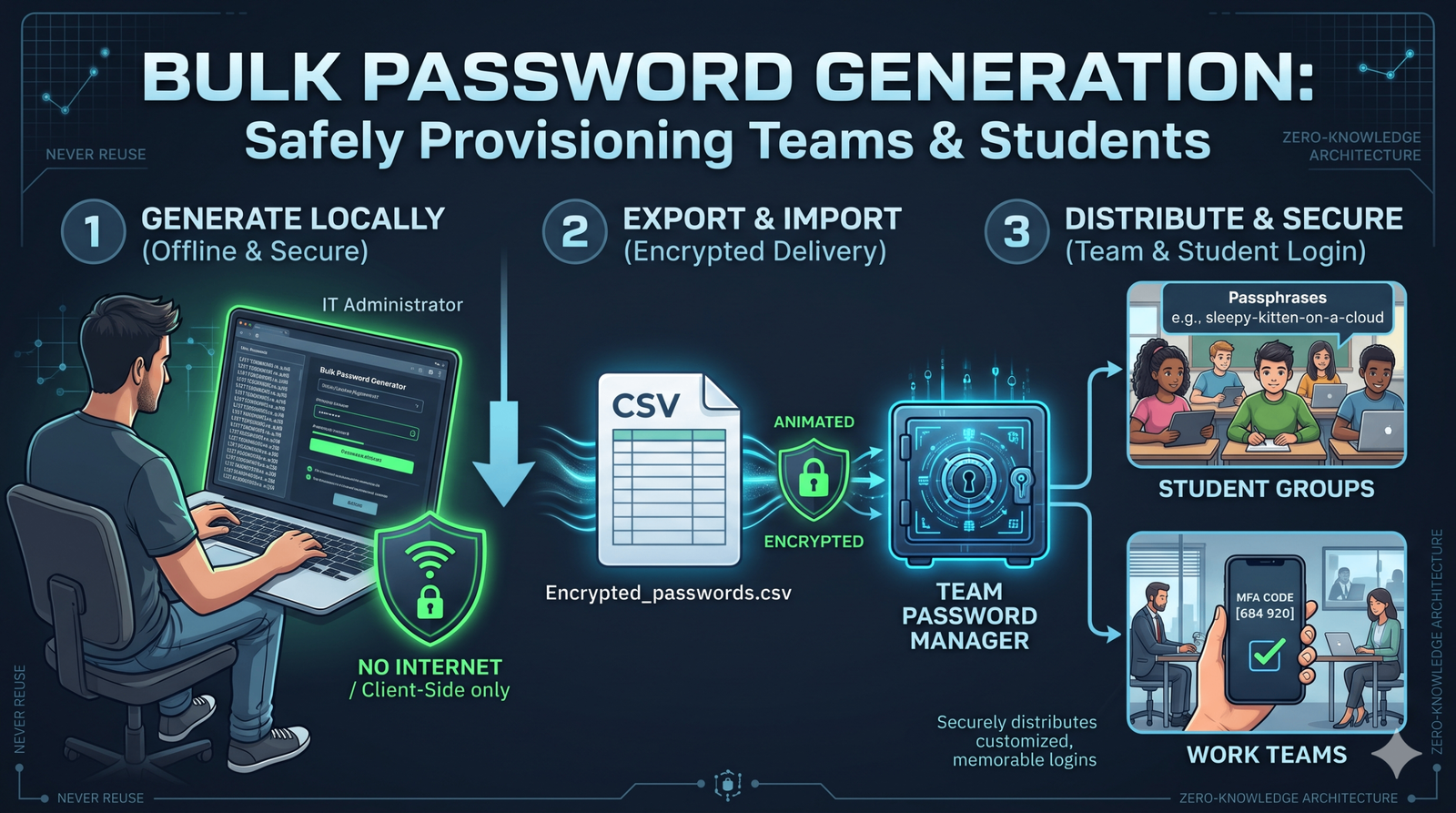
[ Your Browser ] → Sends Request (Count: 500) → [ Web Server ]
↓
Generates 500 Keys
↓
[ Your Browser ] ← Transmits 500 Keys ← Logs/Saves Keys?
[ Your Browser ] → Local JS Engine (window.crypto) → Generates Keys
Data NEVER leaves local device memory!
Why Server-Side Bulk Tools Threaten Your Infrastructure
When a website generates bulk passwords on its web server, your browser must send an HTTP request asking for those keys. The server generates the batch and transmits the results back to your screen across the open internet.
This architecture introduces three severe vulnerabilities:
- Server Logging & Storage: You have no way of knowing if the host website logs generated batches in server access files, database caches, or analytics pipelines. If that web server is ever breached, your freshly created batch of 500 passwords could be exposed.
- Transit Interception (Man-in-the-Middle): Transmitting large batches of unencrypted plain-text credentials over network connections creates unnecessary exposure to network inspection, proxy logging, and malicious browser extensions.
- API Rate Limits & Timeouts: Server-side batching requires heavy backend computation. Generating 1,000 complex passwords can cause server timeouts, rate limits, or slow response times.
The Solution: Zero-Knowledge Client-Side Generation
The modern standard for web security is zero-knowledge client-side processing.
Tools like the CreatePassword.in Bulk Password Generator run entirely inside your web browser's JavaScript engine.
When you request 500 passwords, your browser uses your computer's local CPU to execute cryptographic algorithms. Zero data is sent across the internet, zero network requests are created, and no external server ever sees or stores your generated keys.
Section 3: The Cryptographic Math Behind Mass Generation
When generating passwords in mass quantities, two mathematical questions immediately arise:
- How secure is each individual password in the batch?
- Is there a risk that two passwords in a large batch will be identical (a collision)?
Let us examine the math that guarantees security and uniqueness across mass batches.
Individual Entropy Calculation
As established in cryptographic science, the entropy E of a password measures its mathematical randomness in bits:
L is the character length.
N is the character pool size.
When you configure your bulk password generator to create 16-character passwords using a full keyboard pool (N = 94 containing lowercase, uppercase, numbers, and symbols), each password yields:
A password with 104.87 bits of entropy represents a search space of 94⁹⁶ ≈ 3.72 × 10⁽₁ possible combinations.
To put this in perspective: even if a supercomputer tests 100 billion guesses per second, cracking a single 16-character key would take over 11.7 million years.
The Collision Fallacy: Will Bulk Passwords Duplicate?
A common concern among system administrators when using a mass password generator is whether two users in a batch of 1,000 might accidentally receive the same password.
This concern relates to the famous Birthday Paradox in probability theory. The probability P(collision) of at least one duplicate occurring across k generated keys within a search space S = NL is approximated by:
Let us plug in real numbers for a standard bulk generation run:
- Batch size (k): 1,000 passwords
- Total search space (S): 3.72 × 1031 (for 16-character keys)
P(collision) ≈ 1 − e(−1,000² / 2×(3.72×1031)) = 1 − e(−106/7.44×1031) ≈ 0
The mathematical probability of producing a duplicate password in a batch of 1,000 keys is less than 1 in 1025. You are more likely to win the global lottery multiple times in a row than to encounter a collision in cryptographically secure bulk generation!
Section 4: How Client-Side Batch Generation Works (With Code Example)
To understand how high-performance browser tools generate hundreds of passwords instantly without freezing your screen, we must look at how modern JavaScript handles cryptographic randomness.
Pseudo-Random vs. Cryptographically Secure Randomness
Standard random functions in programming languages — such as Math.random() in JavaScript or random.random() in Python — are Pseudo-Random Number Generators (PRNGs). They use deterministic mathematical formulas that start from a seed value. If an attacker guesses the seed, they can predict every subsequent password generated in the batch!
For secure batch generation, browser tools must use a Cryptographically Secure Pseudo-Random Number Generator (CSPRNG). In modern web browsers, this is handled by the Web Cryptography API via window.crypto.getRandomValues().
Hardware Entropy Sources (CPU Thermal Noise, Mouse Movement, Interrupts)
↓
window.crypto.getRandomValues()↓
Cryptographically Secure Uint8Array / Uint32Array Buffer
Clean Implementation: Client-Side Batch Generator Script
Below is a lightweight, production-grade JavaScript function demonstrating how client-side bulk password generation works without server dependencies:
/**
 * Generates a batch of cryptographically secure random passwords.
 * Runs 100% client-side in browser memory using window.crypto.
 *
 * @param {number} count  - Number of passwords to generate (e.g., 100).
 * @param {number} length - Character length per password (e.g., 16).
 * @param {object} options - Toggle character sets.
 * @returns {Array<string>} Array of generated plain-text passwords.
 */
function generateBulkPasswords(count = 50, length = 16, options = {}) {
  const defaultOptions = {
    lowercase: true,
    uppercase: true,
    numbers: true,
    symbols: true,
    excludeAmbiguous: true // Excludes l, 1, I, O, 0 to prevent typing errors
  };

  const config = { ...defaultOptions, ...options };

  // Build character pool
  let charPool = "";
  if (config.lowercase) charPool += "abcdefghijklmnopqrstuvwxyz";
  if (config.uppercase) charPool += "ABCDEFGHIJKLMNOPQRSTUVWXYZ";
  if (config.numbers)   charPool += "0123456789";
  if (config.symbols)   charPool += "!@#$%^&*()_+-=[]{}|;:,.<>?";

  // Remove visually ambiguous characters if requested
  if (config.excludeAmbiguous) {
    charPool = charPool.replace(/[l1IO0]/g, "");
  }

  if (charPool.length === 0) {
    throw new Error("Character pool cannot be empty.");
  }

  const poolLength = charPool.length;
  const bulkResults = [];

  // Allocate typed array buffer for CSPRNG randomness
  const randomBuffer = new Uint32Array(length);

  for (let i = 0; i < count; i++) {
    let singlePassword = "";
    // Fill buffer with hardware-backed random values
    window.crypto.getRandomValues(randomBuffer);

    for (let j = 0; j < length; j++) {
      // Modulo reduction over secure uint32 values
      singlePassword += charPool[randomBuffer[j] % poolLength];
    }

    bulkResults.push(singlePassword);
  }

  return bulkResults;
}

// Example Usage: Generate 50 secure 18-character passwords instantly
// const myBatch = generateBulkPasswords(50, 18);
// console.log(myBatch);
Because this algorithm operates directly on typed arrays in local browser memory, it can generate 1,000 20-character passwords in under 15 milliseconds!
Section 5: Step-by-Step Guide: Generating & Formatting Bulk Passwords
When preparing credentials for database imports or enterprise distribution, formatting matters just as much as security. Follow this step-by-step workflow to configure, generate, and export your batch safely.
| Step | Action | Details |
|---|---|---|
| Step 1 | Define Requirements | Set length, character sets, and ambiguous character rules |
| Step 2 | Set Batch Size | Choose quantity: 10, 50, 100, or 500 passwords |
| Step 3 | Generate Client-Side | Instant execution in local browser memory |
| Step 4 | Select Export Format | TXT (line breaks), CSV, or JSON data |
| Step 5 | Secure File Storage | Encrypt export file & purge local memory |
Step 1: Configure Custom Parameter Rules
Before clicking generate, tailor your parameters to match your target system's requirements:
- Set Length to 16+ Characters: Unless constrained by legacy software limitations, always default to a minimum of 16 characters per credential.
- Toggle Ambiguous Characters OFF: When creating temporary passwords that humans must manually read and type from a printout or card, exclude visually confusing characters like lowercase
l, uppercaseI, number1, capitalO, and number0. - Include Full Character Classes: Enable uppercase, lowercase, digits, and standard special characters (
!,@,#,$,%).
Step 2: Choose the Right Export File Format
Different deployment scenarios require different output structures. A quality bulk password creator should support multiple export options:
Option A: Plain Text (.TXT) with Line Breaks
Best for copying directly into terminal scripts, Bash loops, or text editors. Each password appears on a new line:
xK9#mQ2_vL8!pZ4_aB
rP7$wN3*kT9@mY1_cX
mJ4!vR8_pL2#zQ9_wK
Option B: Comma-Separated Values (.CSV)
Best for importing directly into spreadsheets (Excel, Google Sheets), Active Directory bulk user management tools, or HR provisioning software:
User_ID,Temporary_Password,Status
User_101,xK9#mQ2_vL8!pZ4_aB,Pending
User_102,rP7$wN3*kT9@mY1_cX,Pending
User_103,mJ4!vR8_pL2#zQ9_wK,Pending
Option C: JavaScript Object Notation (.JSON)
Best for web developers seeding mock databases or working with REST API payloads:
[
  { "id": 1, "temp_key": "xK9#mQ2_vL8!pZ4_aB" },
  { "id": 2, "temp_key": "rP7$wN3*kT9@mY1_cX" },
  { "id": 3, "temp_key": "mJ4!vR8_pL2#zQ9_wK" }
]
Section 6: Real-World Enterprise Use Cases
Let us look at four practical scenarios where deploying a client-side batch password generator saves time while boosting enterprise security.
Use Case A: Active Directory & LDAP User Onboarding
When an enterprise hires a cohort of 50 new remote employees, IT system administrators must provision email accounts, VPN access, and domain profiles.
By using a bulk random password generator, the sysadmin generates 50 unique 18-character keys, exports them as a CSV file, and feeds them directly into PowerShell scripts (New-ADUser). Every employee receives a unique, uncrackable temporary key on day one.
Use Case B: Database Seeding for Development Staging
Software engineering teams frequently build staging environments that mirror production databases. Populating user tables with hardcoded test passwords like test123 creates severe vulnerabilities if staging servers are accidentally exposed to the public internet.
Engineers use bulk tools to generate 1,000 distinct seed passwords, converting them to bcrypt or Argon2 hashes during database migration scripts.
Use Case C: Incident Response & Emergency Key Rotation
If a company discovers that a shared configuration file or API key secret was accidentally exposed in a public GitHub repository, incident response teams must rotate dozens of database passwords, service account credentials, and system tokens immediately.
A bulk generator allows security teams to create dozens of high-entropy replacement strings instantly, restoring operational security in minutes.
Use Case D: Conference Wi-Fi & Temporary Guest Vouchers
Event managers hosting large trade shows or technical conferences often need to issue temporary Wi-Fi access tokens for thousands of attendees.
Generating a batch of short, distinct, non-ambiguous passphrases allows organizers to print individual access slips that guests can type easily without error.
Section 7: Comparison Matrix: Bulk Credential Creation Methods
How does using an online client-side bulk password generator compare to other common approaches?
| Method | Generation Speed | Security Level | Setup Required | Risk of Leak / Exposure | Best Used For |
|---|---|---|---|---|---|
| Manual Typing | Extremely Slow (1 key/min) | Very Low (Human Bias) | None | High (Predictable Patterns) | Personal Accounts |
| Server-Side Online Tool | Moderate | Low to Medium | None | High (Server logs, Network Transit) | Avoid for sensitive work |
| Python / Bash Script | Fast | High (If CSPRNG used) | Coding Required | Low (Local execution) | Developers & Sysadmins |
| Client-Side Web Tool | Instant (< 15ms) | Maximum (window.crypto) | Zero (Runs in browser) | Zero (Zero-Knowledge) | Everyone (Fast & Safe) |
Section 8: Best Practices for Handling Bulk Password Exports
Generating strong bulk passwords is only half the battle. If you save your exported CSV or TXT file on an unencrypted desktop folder, you create a major security vulnerability.
Follow these rules for safe post-generation handling:
- Rule 1: Always force "Change Password on First Login" for end users.
- Rule 2: Store temporary export files in encrypted vaults (VeraCrypt).
- Rule 3: Securely wipe export files after importing (Shred / srm).
- Rule 4: Never send unencrypted CSV files over email or Slack.
- Rule 5: Hash passwords immediately before storing in databases.
- Enforce Password Reset on First Login: Temporary passwords generated in bulk should only serve as entry keys. Configure your authentication server to require users to choose a new, private credential upon their initial sign-in.
- Never Send Bulk Plain-Text Files via Email: If you must distribute credentials to team leads, never send an unencrypted
.csvor.txtattachment over standard email or chat channels. Use secure secret-sharing tools or encrypted vaults. - Securely Wipe Export Files: Once your bulk passwords have been imported into your database or Active Directory system, permanently delete the export file from your local machine using secure file shredding utilities rather than moving it to the standard recycle bin.
- Hash Passwords at Rest: Never store generated plain-text passwords in databases. Always run credentials through salted, modern cryptographic hashing functions such as Argon2id, bcrypt, or PBKDF2 before saving them to disk.
Section 9: Summary & Key Takeaways
When managing user credentials at scale, convenience must never come at the expense of security. Leveraging a modern bulk password generator bridges the gap between speed, convenience, and enterprise security.
Keep these key rules in mind for your next batch generation task:
- Demand Client-Side Processing: Always verify that your batch tool operates 100% locally in browser memory via
window.cryptoto protect your network integrity. - Aim for 16+ Characters: Maintain a minimum length of 16 characters per key to guarantee over 100 bits of entropy per credential.
- Exclude Ambiguous Characters for Humans: When generating credentials intended for manual typing, toggle off confusing characters like
l,1,I,0, andO. - Export Cleanly: Choose output structures (CSV, JSON, TXT) that fit directly into your deployment pipelines without requiring manual reformatting.
Ready to generate secure batch credentials for your project? Use our zero-knowledge Bulk Password Generator Tool or create individual high-entropy passphrases on our homepage at CreatePassword.in.
Frequently Asked Questions (FAQ)
Is it safe to generate passwords in bulk online?
It is completely safe ONLY if the web tool executes 100% client-side in your browser's local JavaScript memory using window.crypto. Client-side tools generate credentials locally without sending requests over the internet or touching an external web server. Avoid tools that transmit generation requests over the network.
How many passwords can I generate at once in a browser?
Using optimized client-side JavaScript, modern web browsers can generate thousands of unique 16+ character passwords in a fraction of a second. Because the processing occurs on your device's CPU, there are no server timeouts or network rate limits.
Can bulk-generated passwords contain duplicates?
When generating passwords with 16 or more characters from a standard 94-character pool, the mathematical probability of generating a duplicate (a collision) in a batch of 1,000 keys is effectively zero — less than 1 in 1025.
What format should I export my bulk passwords in?
Choose an export format based on your intended workflow:
- Plain Text (.TXT): Ideal for terminal scripts, command-line loops, or quick copying.
- CSV (.CSV): Ideal for spreadsheet manipulation and importing into Active Directory or HR user systems.
- JSON (.JSON): Ideal for web application developers seeding test databases or API backends.
Why shouldn't I use a simple Python or Bash random script for bulk generation?
Standard pseudo-random functions in basic scripting languages (like Python's random module or Bash's $RANDOM variable) are not cryptographically secure. They use predictable mathematical seeds that attackers can reverse-engineer. If writing custom scripts, always use cryptographically secure modules such as Python's secrets module or Node.js's crypto library.
How should temporary bulk passwords be distributed to new users?
Always configure your authentication system to force a mandatory password reset upon a user's first login. Furthermore, never distribute temporary bulk passwords via unencrypted plain-text emails or public chat channels; use secure, encrypted secret-distribution channels instead.
About the Author
The CreatePassword team specializes in cryptographic security, client-side Web APIs, and online privacy. We build open-access, zero-knowledge utilities to help users protect their digital identity without financial barriers. Learn more on the createpassword.in Security Hub.
Related Resources:

Leave a comment
Comments are moderated before appearing. Please keep it respectful and on-topic. Your email is required for verification but is never displayed publicly or shared.