
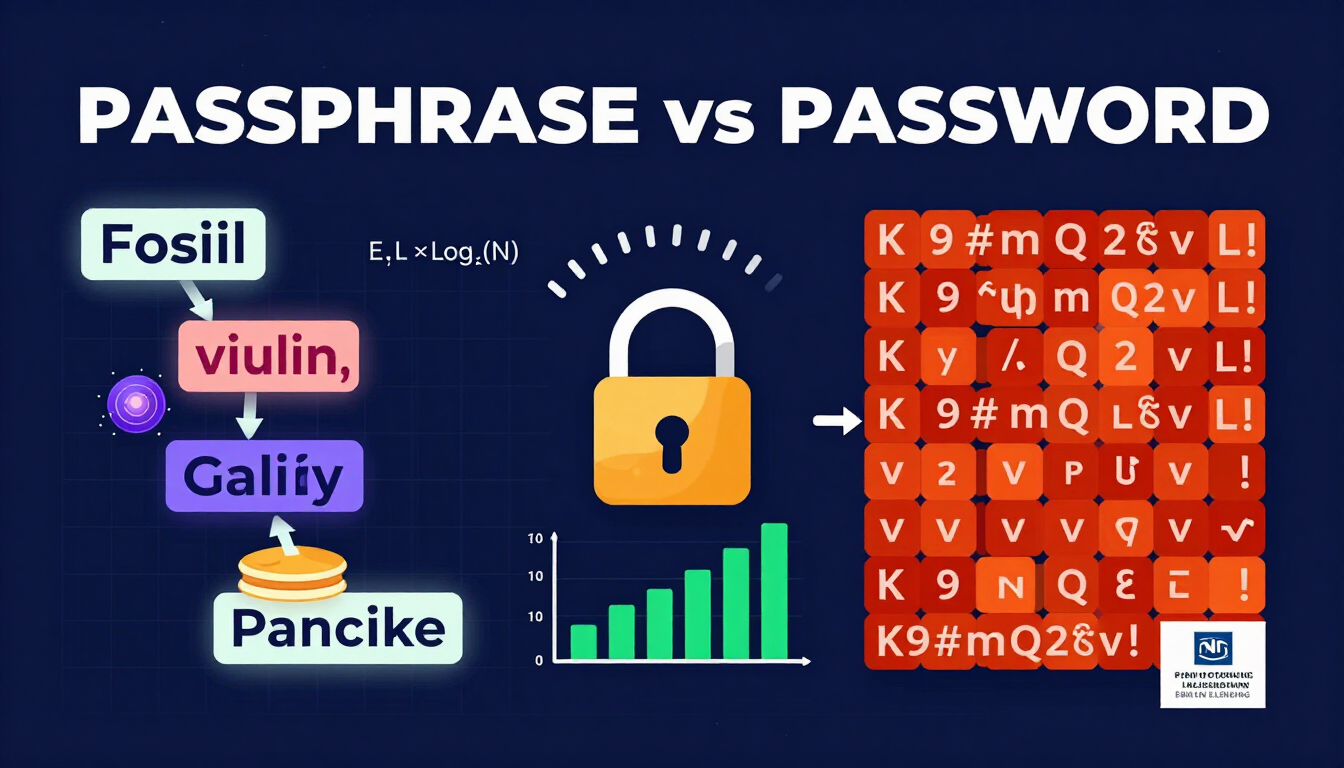
For decades, internet users were given a standard set of security rules: create a short password, capitalize a few letters, insert a number, add a special symbol, and change it every 90 days.
That advice has proven to be counterproductive.
In 2026, forcing complex character requirements on short passwords creates a false sense of security. Human users instinctively adopt predictable patterns (such as changing Password to P@ssw0rd1!), which automated cracking software easily decodes in milliseconds.
Meanwhile, forcing periodic resets leads to password fatigue, credential reuse, and insecure post-it note habits.
The modern consensus among security researchers, cryptographic institutions, and government bodies like the National Institute of Standards and Technology (NIST) is clear: Length outperforms complexity, and passphrases are superior to traditional passwords.
This comprehensive guide breaks down the structural differences between passphrases and passwords, evaluates the underlying mathematical entropy formulas, analyzes resistance against GPU hardware arrays, and provides a clear blueprint for securing your digital accounts.
Section 1: What is a Password vs. What is a Passphrase?
While both serve as authentication secrets used to prove your identity to a computer system, their structural design, usability, and defensive mechanics differ fundamentally.
TRADITIONAL PASSWORD (10 Characters)
[ P ] [ @ ] [ s ] [ s ] [ w ] [ 0 ] [ r ] [ d ] [ 1 ] [ ! ]
Structure: Short, complex, high cognitive load, low length entropy
MODERN PASSPHRASE (28 Characters / 4 Random Words)
[ correct ] - [ horse ] - [ battery ] - [ staple ]
Structure: Long, word-based, zero cognitive fatigue, massive length entropy
The Traditional Password
A traditional password is a compact string of characters — typically between 8 and 12 characters long — that attempts to maximize security by mixing uppercase letters, lowercase letters, numbers, and symbols.
- Example:
K9#mQ2$vL!8 - Length: 11 characters
- Human Experience: Extremely difficult to memorize, awkward to type on mobile keyboards, prone to typos, and frequently forgotten.
- Security Profile: Vulnerable to brute-force attacks due to short length, despite high character diversity.
The Modern Passphrase
A passphrase is a longer sequence composed of multiple distinct, randomly selected words separated by spaces, hyphens, or custom delimiters. It typically spans 16 to 35+ characters.
- Example:
correct-horse-battery-stapleortimber-fossil-violin-galaxy - Length: 27 to 30+ characters
- Human Experience: Simple to memorize through mental imagery, fluid to type across touchscreen devices, and low cognitive overhead.
- Security Profile: Resistant to GPU hardware cracking arrays because its sheer character length expands the mathematical search space beyond realistic computational reach.
Section 2: Head-to-Head Comparison: Passphrase vs. Password
To understand why cybersecurity frameworks are retiring traditional password rules, review this technical side-by-side comparison:
| Feature / Metric | Traditional Password | Modern Passphrase |
|---|---|---|
| Typical Character Length | 8 to 12 characters | 16 to 35+ characters |
| Primary Source of Strength | Character complexity (symbols, numbers) | Structural length (exponential search space) |
| Memorability | Poor (requires artificial mnemonics) | High (leverages human narrative memory) |
| Typing Ergonomics | Prone to mobile keying errors | Fast, fluid, natural language typing |
| Dictionary Attack Defense | Moderate (if heavily randomized) | Complete (if words are selected at random) |
| Brute-Force GPU Defense | Weak to Moderate (cracked in hours/days) | Virtually uncrackable (takes centuries) |
| Human Pattern Susceptibility | High (predictable @ for a substitutions) | Low (when using automated Diceware selection) |
| NIST 800-63B Compliance | Deprecated / Noncompliant | Fully Compliant & Recommended |
Section 3: The Mathematics of Security: Entropy & Collision Probability
The defense of any secret key boils down to mathematics. Cryptographers measure password strength using information entropy, expressed in bits. Entropy measures how unpredictable a secret string is to an attacker who knows the rules used to generate it.
The Fundamental Entropy Formula
The entropy of any randomly generated secret is defined by the standard equation:
Where:
• E equals the resulting information entropy measured in bits.
• L equals the total length of the sequence (number of characters or number of words).
• N equals the size of the pool of possibilities available at each step.
Case Study A: The Complex Short Password
Consider a high-complexity 10-character password generated from the full printable ASCII set (95 possible characters: uppercase, lowercase, numbers, and symbols).
- Character Pool Size (N): 95
- Password Length (L): 10
- Entropy Calculation: E = 10 × log₂(95) ≈ 10 × 6.56985 = 65.70 bits
- Total potential character combinations: 265.70 ≈ 6.07 × 10¹⁹ possibilities.
While 65.7 bits sounds impressive, human behavior ruins this calculation. Real humans rarely generate truly random 10-character strings. Instead, they choose dictionary words and apply predictable substitutions.
When an attacker uses a rule-based dictionary attack (e.g., trying common base words combined with digit and symbol append rules), the effective entropy drops from 65.7 bits to under 30 bits, reducing crack time from years to less than 3 seconds.
Case Study B: The Random 5-Word Passphrase
Now consider a passphrase constructed by selecting 5 words at random from a standard EFF Diceware wordlist containing 7,776 unique words.
- Word Pool Size (N): 7,776
- Passphrase Length (L): 5 words
- Entropy Calculation: E = 5 × log₂(7,776) ≈ 5 × 12.9248 = 64.62 bits
- Total potential word combinations: 264.62 ≈ 2.84 × 10¹⁹ possibilities.
10-Char Complex Password (ASCII 95) : ~65.7 Bits (Theoretical)
Human-Pattern 10-Char Password : ~30 Bits (Actual Effective Strength)
5-Word Random Diceware Passphrase : ~64.6 Bits (Unshrinkable)
Why Passphrases Win on Effective Entropy
Unlike short passwords, a randomly generated passphrase cannot be collapsed by rule-based cracking engines.
Because every word in the 5-word passphrase was chosen independently from a 7,776-word dictionary, an attacker cannot shortcut the search space. They must iterate through all 28.4 quintillion word combinations. There are no "first letter capital" or "symbol at the end" tricks to exploit.
Evaluating Word Collision Probability
To calculate the statistical likelihood of two independent passphrase generators producing identical outputs (or an attacker guessing a secret within k tries), cryptographers use the mathematical approximation for collision probability:
Where:
• k is the number of attempts or generated passphrases.
• N is the total size of the key space (2E).
Because N for a 5-word random passphrase is over 2.84 × 10¹⁹, the probability P(collision) remains practically zero even after billions of automated guessing iterations.
Section 4: Modern GPU Hardware & Offline Cracking Speeds
To understand why passwords fail while passphrases succeed, we must look at how modern hackers break credentials in the real world. Attackers do not spend time typing passwords into a web page login form; those portals are protected by rate limits, CAPTCHAs, and IP blocks.
Instead, attackers obtain exfiltrated database leaks containing hashed passwords. They load these hashes into specialized software like Hashcat or John the Ripper running on dedicated hardware cracking rigs equipped with high-performance GPUs.
[ Breached Hash Database ]
↓
[ Hashcat Engine ] ===> [ GPU Array (400 GH/s) ]
↓
[ Hash Match Found! ]
GPU Cracking Benchmarks (2026 Hardware)
A standard multi-GPU enterprise cracking cluster (utilizing 8x modern hardware GPUs) achieves staggering speeds on legacy hashing algorithms:
- NTLM (Windows Hashes): > 450 Billion hashes per second (450 GH/s)
- MD5: > 300 Billion hashes per second (300 GH/s)
- SHA-256 (Unsalted): > 60 Billion hashes per second (60 GH/s)
- bcrypt (Cost 12): ~ 40,000 hashes per second (40 kH/s)
Crack Time Comparison Matrix
Assuming an attacker executes 100 Billion guesses per second (100 GH/s) against a leaked database using fast hashing:
| Secret Structure | Total Length | Total Combinations | Average Time to Crack |
|---|---|---|---|
Complex Password (K9#mQ2$vL!) | 10 Characters | 6.07 × 10¹⁹ | 3.5 days |
Predictable Password (P@ssw0rd2026!) | 13 Characters | Reduced via Rules | 12 seconds |
Random 3-Word Passphrase (cloud-banana-river) | 3 Words (~17 Chars) | 4.70 × 10¹¹ | 0.004 seconds |
Random 4-Word Passphrase (cloud-banana-river-magnet) | 4 Words (~23 Chars) | 3.65 × 10¹⁵ | 5 hours |
Random 5-Word Passphrase (cloud-banana-river-magnet-guitar) | 5 Words (~30 Chars) | 2.84 × 10¹⁹ | 450 years |
Random 6-Word Passphrase (cloud-banana-river-magnet-guitar-pancake) | 6 Words (~38 Chars) | 2.21 × 10²³ | 3.5 million years |
Section 5: The Diceware System: How to Generate Truly Secure Passphrases
A common pitfall when adopting passphrases is selecting words humanly. When people attempt to create their own passphrase, they rely on familiar mental associations — such as i-love-my-golden-retriever or winter-is-coming-2026.
These humanly constructed phrases are not secure. They exist in published literature, movie scripts, and public social media posts, making them easy targets for smart dictionary attacks.
To guarantee cryptographic protection, passphrases must be generated using randomized selection systems, such as the Diceware method.
1. Roll a standard 6-sided die 5 times in succession.
2. Record the 5-digit number outcome (e.g., 2 - 4 - 1 - 5 - 3 → "24153").
3. Look up "24153" in the official EFF Diceware Wordlist.
4. Match: "24153" = "elephant".
5. Repeat this process 5 times to form a complete 5-word secret sequence.
Why Physical or Cryptographic Randomness Matters
The integrity of the Diceware system relies on the fact that every word selection is completely decoupled from human preference.
When you generate a passphrase using a secure tool like the CreatePassword.in Passphrase Generator, the software uses hardware-backed cryptographic random number generators (crypto.getRandomValues() in modern web browsers) to simulate physical dice rolls. This ensures that:
- Words are evenly distributed across the entire 7,776-word dictionary.
- There are no semantic connections or grammatical links between adjacent words.
- Attackers cannot utilize natural language processing (NLP) models to predict the next word in the sequence.
Section 6: Cognitive Memory & Human Usability Dynamics
The ultimate weakness of traditional complex passwords is that they clash with human memory architecture.
Psychological research into human cognition shows that the human brain excels at storing visual imagery, narrative stories, and spatial concepts, but struggles to retain arbitrary strings of symbols and mixed-case letters.
TRADITIONAL COMPLEX PASSWORD:
xK7#m$9LBrain Effort: Forces rote memorization of abstract glyphs.
Retention Rate: High drop-off after 7 days → Result: User writes it on paper.
RANDOM PASSPHRASE:
fossil-violin-galaxy-pancakeBrain Effort: Brain forms an immediate visual scene (a fossil playing a violin in space next to a stack of pancakes).
Retention Rate: Exceptionally high long-term retention → Zero written leaks.
The Visual Anchor Effect
When a user reads a passphrase like fossil-violin-galaxy-pancake, the visual cortex instantly constructs a surreal mental scene:
- A prehistoric fossil...
- Playing a wooden violin...
- Floating across a spiraling galaxy...
- While eating a warm pancake.
This mental image acts as a strong cognitive anchor. Long-term memory retrieves narrative scenes with minimal effort, eliminating the frustration of failed logins while maintaining mathematical protection against GPU brute-force attacks.
Section 7: NIST SP 800-63B Standards: Modern Enterprise Guidelines
The National Institute of Standards and Technology (NIST) updated its digital identity guidelines (SP 800-63B) to align enterprise security policies with real-world human behavior. These guidelines explicitly dismantle legacy password rules.
[+] MANDATE minimum secret length of at least 8 characters (16+ recommended).
[+] SUPPORT maximum lengths up to at least 64 characters (enabling long phrases).
[+] PERMIT all ASCII and Unicode characters, including spaces and symbols.
[+] ALLOW copy-and-paste functionality to encourage password manager adoption.
[-] PROHIBIT arbitrary character composition rules (forcing uppercase/symbols).
[-] PROHIBIT mandatory periodic password expiration without evidence of breach.
[-] PROHIBIT hint questions that can be solved via social engineering.
Key Takeaways for IT Directors & System Administrators
- Remove Composition Rules: Stop forcing users to include at least one uppercase letter, one number, and one symbol. Composition requirements cause users to create predictable variations of simple words.
- Support Spaces & High Character Limits: Ensure your database and authentication forms accept inputs up to 64 characters or longer and do not strip whitespace delimiters.
- Check against Compromised Lists: Replace composition rules with automated screening against known breach databases (e.g., HaveIBeenPwned API) during registration to catch re-used or exposed credentials.
Section 8: Step-by-Step Blueprint: How to Implement Passphrases Today
Upgrading your account security from short passwords to random passphrases requires a structured approach. Follow this step-by-step implementation guide:
[Step 1] Acquire a Secure Password Manager (Bitwarden / 1Password)
|
[Step 2] Create a 5-Word Master Vault Passphrase
|
[Step 3] Update Core Identity Accounts (Primary Email, Bank, SSO)
|
[Step 4] Enforce Multi-Factor Authentication (Hardware Keys / TOTP)
Step 1: Establish Your Master Passphrase
Your password manager stores all your sensitive digital credentials behind a single encryption key. This Master Password should be a 5-word or 6-word random passphrase.
- Navigate to a secure, client-side generator like CreatePassword.in.
- Select the Passphrase mode.
- Set word count to 5 or 6 words.
- Choose a clean separator (hyphens
-or spaces). - Memorize this sequence using the Visual Anchor Technique.
Step 2: Store Unique Credentials for Every Secondary Service
Do not attempt to memorize passphrases for all 100+ websites you use. Use your password manager to generate and store individual secrets for every account:
- For accounts where you type credentials manually on hardware devices (TVs, gaming consoles, mobile apps), generate 4-word passphrases.
- For automated web browsers, generate 20+ character random complex passwords directly through your manager.
Step 3: Audit & Upgrade High-Value Targets First
Prioritize your accounts by threat level:
- Primary Email Accounts: If an attacker breaches your email, they can trigger password reset links for all linked digital services.
- Financial & Investment Portals: Protect online banking, trading accounts, and crypto wallets.
- Password Manager Master Vault: Ensure maximum protection for your central repository.
- Social Media & Work Email: Prevent identity theft and spear-phishing attacks.
Frequently Asked Questions
What is the main difference between a password and a passphrase?
A password is typically a single short string of characters (usually 8 to 14 characters) combining letters, numbers, and symbols. A passphrase is a longer sequence composed of multiple complete words (usually 4 to 7 words, spanning 20 to 35+ characters), providing vastly superior entropy while remaining easy for humans to remember.
Are passphrases really safer than complex passwords with symbols?
Yes. Passphrases derive their strength from sheer length rather than character complexity. Adding length increases mathematical search space exponentially. A 4-word random passphrase provides greater brute-force cracking resistance than a complex 10-character password filled with numbers and special symbols.
How does the entropy formula apply to passphrases?
Entropy measures unpredictability in bits. It is calculated using the formula E = L × log₂(N). For passphrases using a Diceware dictionary, N is the word pool size (7,776 words) and L is the number of words. A 5-word passphrase yields roughly 64.6 bits of entropy, requiring centuries to crack.
Why do NIST 2026 guidelines favor passphrases over traditional complex passwords?
The NIST 800-63B standards favor passphrases because traditional complexity rules (requiring uppercase letters, numbers, and symbols) force users into predictable human patterns like capitalizing the first letter or substituting @ for a. Passphrases encourage natural length (up to 64+ characters) without forcing arbitrary character mixing.
Can I use famous book quotes or song lyrics as my passphrase?
No. Pre-existing quotes, song lyrics, idioms, and famous book phrases exist in public literature and are included in hacker wordlists used during dictionary attacks. A secure passphrase must consist of completely random, unrelated words generated using tools like Diceware or automated cryptographic generators.
How many words should a secure passphrase contain?
For personal everyday accounts, a 4-word random passphrase (yielding ~51.6 bits of entropy) is recommended. For high-security accounts, master vault passwords, and corporate admin credentials, a 5-word or 6-word passphrase (yielding 64.6 to 77.5 bits of entropy) provides long-term defense against GPU cracking clusters.
About the Author
I am Venkateswara Rao, founder of CreatePassword.in. I build free browser-based password tools and practical security guides. Learn more on the createpassword.in Security Hub.
Related Resources:


Leave a comment
Comments are moderated before appearing. Please keep it respectful and on-topic. Your email is required for verification but is never displayed publicly or shared.