
What Are the Best Girl Password Ideas?
The best girl password ideas use a "passphrase" strategy. Instead of a single predictable word, string together 3 to 4 random aesthetic, cute, or funny words, separated by dashes or symbols. Examples include Matcha-Lipgloss-Sunrise-88! or Velvet-Daisy-Record-92$. This makes them easy to remember but mathematically impossible for hackers to guess.
- Use 3 to 4 words stacked into a single passphrase.
- Separate words with dashes or symbols to add built-in special characters.
- Append numbers and symbols at the end for extra entropy.
- Pick aesthetic, cute, or funny words that are personal but not public information.
How to use these ideas safely
Do not use the exact examples shown. Generate your own password.
Try our Password Generator
Generate a Strong PasswordHow to Make a Cute Password Secure
Most people think "cute" means "easy to hack." That is false. Length matters more than complexity.
Cybersecurity experts at NIST (National Institute of Standards and Technology) now recommend using passphrases. A passphrase is a sequence of words. When you take aesthetic words and stack them together, you create a password that is highly secure and deeply personal.
Use these 50 ideas as templates. Change the numbers, swap a word, or add your favorite symbols.
Aesthetic Password Ideas
- Midnight-Velvet-Moon-77!
- Lavender-Haze-Vinyl-22$
- Matcha-Latte-Cloud-89*
- Vanilla-Aura-Dream-44#
- Golden-Hour-Peony-11@
- Pastel-Sunset-Glow-93!
- Cherry-Blossom-Rain-66%
- Silver-Lining-Star-55^
- Rose-Gold-Glitter-33&
- Silk-Ribbon-Pearl-88*
- Ocean-Breeze-Shell-12!
- Cozy-Sweater-Vibe-99#
Cute & Sweet Passwords
- Peach-Cobbler-Smile-24$
- Daisy-Petal-Dance-67!
- Strawberry-Jam-Heart-55@
- Honey-Bee-Bliss-42*
- Bumble-Puppy-Paws-19!
- Sprinkle-Donut-Joy-88%
- Cotton-Candy-Sky-34^
- Gummy-Bear-Magic-76&
- Fairy-Dust-Wish-91!
- Sugar-Plum-Fairy-22@
- Bubble-Gum-Pop-44#
- Glazed-Berry-Tart-56$
- Tulip-Garden-Path-38!
Funny & Quirky Passwords
- Caffeinated-Chaos-Queen-01!
- Snooze-Button-Champion-99*
- Where-Is-My-Coffee-33?
- I-Forgot-This-Again-88$
- Pasta-For-Breakfast-45!
- Nap-Time-Now-Please-22@
- Too-Many-Tabs-Open-77^
- Overthinking-At-Midnight-11#
- Target-Run-Addict-66%
- Spilled-My-Matcha-54!
- Living-In-Sweatpants-89&
- Plants-Are-Dying-Oops-43*
Pop Culture & Vibe Passwords
- Main-Character-Energy-99!
- In-My-Cozy-Era-24$
- Romanticize-Your-Life-55@
- Offline-For-The-Plot-77#
- Book-Club-Romance-12!
- Vinyl-Record-Spin-68%
- Vintage-Camera-Flash-33^
- Thrift-Store-Finds-91&
- Skincare-Routine-Step-4-88!
- Playlist-On-Shuffle-22*
- Early-2000s-Vibes-44$
- Retro-Roller-Skate-76!
- Manifesting-Good-Days-11@
Need something completely random? Use our Random Password Generator.
1. The State of Cybersecurity in 2026
Creating a cute password is fun, but securing your digital life is critical. Hackers no longer sit at keyboards guessing passwords. They use automated tools and artificial intelligence.
Here is what you are up against in 2026:
- Credential Stuffing: Hackers buy lists of leaked passwords from dark web breaches. They use automated bots to test those exact passwords across millions of websites in seconds.
- AI Brute-Forcing: Modern AI can crack an 8-character password (even with symbols) in minutes. The only defense against AI is extreme length.
- Social Engineering: Scammers scrape your TikTok, Instagram, and Spotify to guess your passwords based on your pets, favorite bands, and birthdates.
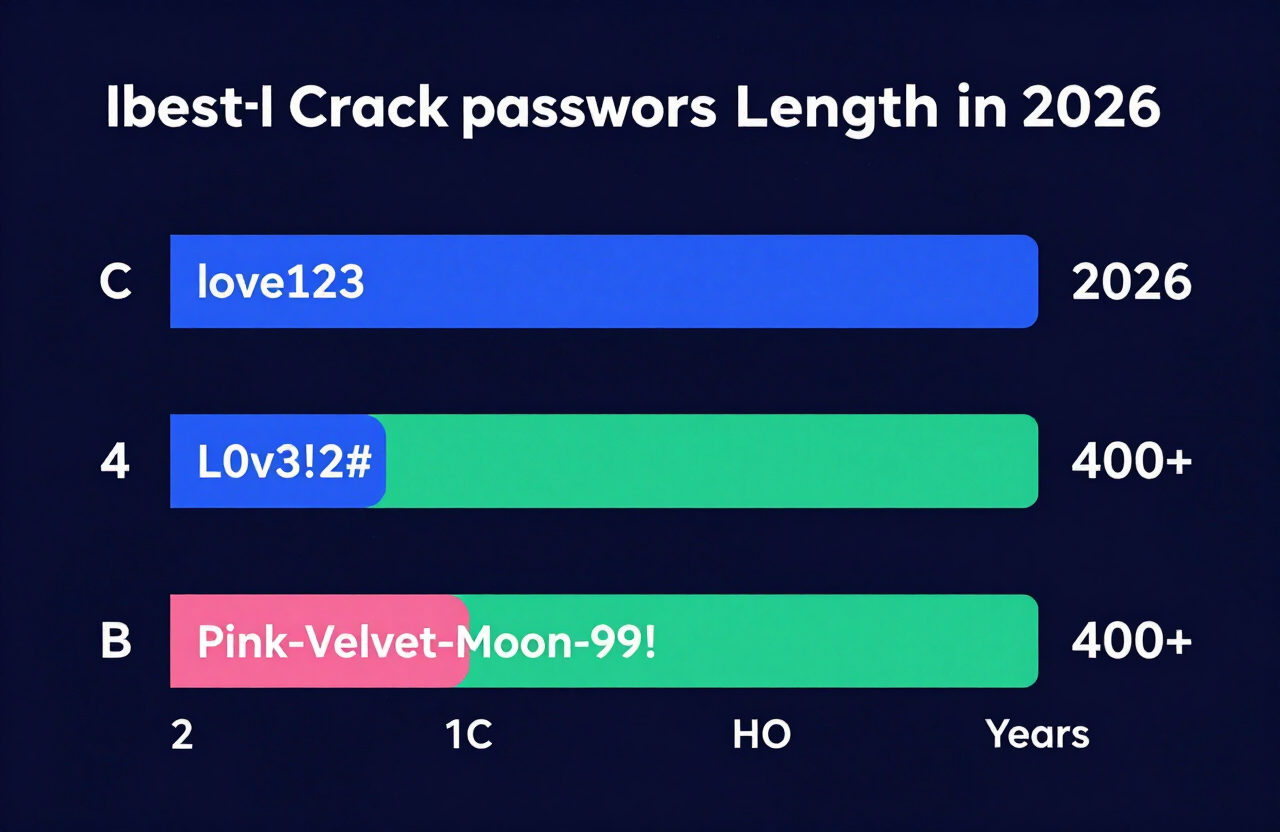
| Password Type | Example | Time to Crack (2026) |
|---|---|---|
| Short & Simple | love123 | Instantly |
| Complex but Short | L0v3!2# | 4 Minutes |
| Long Passphrase | Pink-Velvet-Moon-99! | 400+ Years |
2. The Golden Rule: Never Reuse a Password
You found the perfect girl password idea from the list above. Do not use it for everything. Password reuse is the number one cause of hacked accounts. If you use the same password for your email, Instagram, and bank, a breach at one site compromises everything.
If a hacker steals your password from a low-security website, they immediately plug that password into Google, Apple, and social media platforms. Every single account needs a unique password.
3. How to Use a Client-Side Password Generator Safely
Coming up with 50 unique passwords on your own is impossible. That is where tools come in. But you must use the right kind of tool.
Always use a client-side password generator.
"Client-side" means the password is created locally in your browser. It never travels across the internet, and no server ever sees it.
Here is how to do it correctly:
- Navigate to a trusted client-side tool. Try our Secure Client-Side Password Generator.
- Set the length to at least 16 characters.
- Check the boxes for uppercase, lowercase, numbers, and symbols.
- Generate the password and copy it directly into your password manager.
4. Why You Absolutely Need an Encrypted Password Manager
You cannot memorize 50 different 16-character passwords. Do not write them in your phone's Notes app. Do not write them in a physical planner.
You need a Password Manager.
A password manager is an encrypted digital vault. It remembers all your passwords for you. You only need to remember one thing: your Master Password.
Make your Master Password a long, memorable passphrase from our list above (like Matcha-Latte-Cloud-89*). The manager handles the rest.
How password managers work with our tools:
- Use our Strong Password Creator to generate complex strings for your accounts.
- Paste those strings into your password manager.
- When you visit a website, the manager auto-fills the login for you.
5. The Final Layer: Setting up Multi-Factor Authentication (MFA)
Even the strongest password can be stolen through a phishing email or a fake website. Multi-Factor Authentication (MFA) is your ultimate safety net.
MFA requires two things to log in:
- Something you know (your cute password).
- Something you have (your phone).
Always use an Authenticator App (like Google Authenticator or Authy) instead of SMS text messages. Text messages can be intercepted by hackers using a tactic called SIM swapping. Authenticator apps generate a new, offline code every 30 seconds, making them nearly impossible to hack.
Frequently Asked Questions
What makes a password aesthetically pleasing?
Aesthetic passwords use words that evoke a specific mood, color, or vibe. Words related to nature (cloud, moon, daisy), textures (velvet, silk), or cozy concepts (matcha, latte, sweater) make passwords visually pleasing and fun to type.
Are cute passwords easy to hack?
A cute password is only easy to hack if it is short or predictable (like princess1). If you string three or four cute words together with dashes and numbers (like Peach-Daisy-Ribbon-88!), it becomes a highly secure passphrase.
How long should my password be in 2026?
Security standards in 2026 dictate that passwords should be a minimum of 16 characters long. Length is far more critical than throwing in random, hard-to-remember symbols.
Can I just change a letter to a number, like E to 3?
No. Hackers program their software to automatically test for common substitutions like "@" for "a" or "3" for "e". A password like CUt3G1rL! is cracked almost instantly by modern software.
How often should I change my passwords?
You only need to change your password if you suspect it has been compromised in a data breach, or if you shared it with someone else. Routine password changes actually make you less secure, as people tend to pick weaker passwords when forced to change them often.
Is it safe to save passwords in my browser?
Browser password managers (like Chrome or Safari) are better than nothing, but dedicated, encrypted password managers (like Bitwarden, 1Password, or Dashlane) are much more secure and offer better protection against malware.
What is a Master Password?
A Master Password is the single, highly secure password you use to unlock your encrypted password manager. It is the only password you actually need to memorize.
Why shouldn't I use my pet's name?
Social engineering relies on public information. If your Instagram is full of pictures of your dog "Bella," hackers will immediately try "Bella123" or "Bella2026." Keep public information out of your passwords.
Where can I test if my password idea is strong?
You can use free, client-side tools to check password strength. Check your passphrase strength with our Password Strength Checker to see exactly how long it would take a hacker to break your new password.
What is a good password for a girl?
A good password for a girl combines aesthetic, personal, or fun words into a long string called a passphrase. Instead of using a single predictable word like "princess," string together three or four words separated by symbols and numbers, such as Pink-Velvet-Princess-99!.
What is a unique password?
A unique password is a password you have never used anywhere else before. Every single online account you own must have a completely different password to prevent a hacker from accessing multiple accounts if one website suffers a data breach.
What are the top 10 passwords?
The top 10 most used passwords usually include highly insecure choices like "123456", "password", "123456789", "guest", "qwerty", "12345678", "111111", "12345", "macromedia", and "iloveyou". Hackers test these instantly. You should never use them.
What are some cute passwords?
Cute passwords use sweet, cozy, or aesthetic words combined into a secure passphrase. Examples include Strawberry-Jam-Heart-55@, Cotton-Candy-Sky-34^, or Daisy-Petal-Dance-67!.
What are 5 strong passwords?
Strong passwords rely on length rather than confusing characters. Five strong examples include: 1) Midnight-Velvet-Moon-77!, 2) Matcha-Latte-Cloud-89*, 3) Offline-For-The-Plot-77#, 4) Bumble-Puppy-Paws-19!, and 5) Vintage-Camera-Flash-33^.
What are 10 uses of passwords?
Passwords protect almost every aspect of your digital life, including: 1) Email accounts, 2) Online banking, 3) Social media profiles, 4) Shopping accounts (like Amazon), 5) Phone and computer lock screens, 6) Wi-Fi networks, 7) Medical and health portals, 8) School or university portals, 9) Work networks, and 10) Password managers.
What is a 12 strong password?
A strong 12-character password mixes uppercase letters, lowercase letters, numbers, and symbols without using dictionary words. An example is hT7#kL2@vP9$. However, cybersecurity standards in 2026 strongly recommend using 16 characters or more for true security.
What is a good secret password?
A good secret password is a long passphrase made of completely unrelated words that only you know, like Cactus-Violin-Snowstorm-44!. You should store it safely inside an encrypted password manager so no one else can find it.
What is a strong 20 password?
A strong 20-character password is usually a longer sentence or sequence of words. An example is Listening-To-Vinyl-Records-In-2026!. Because of its extreme length, it would take modern AI programs centuries to crack.
What is a good password list?
A good password list is a collection of unique, randomly generated passphrases for all your accounts. You should never write this list down on paper or in a plain text file. A good password list only lives securely inside an encrypted digital password manager.
Resources & Tools
Home Page
- Password Generator — https://createpassword.in/
Tutorials
- Security Documentation — https://createpassword.in/tutorials
Password Tools
- Password Generator — https://createpassword.in/create-password
- Password Generator — https://createpassword.in/tools/password-generator
- Password & Security Tools — https://createpassword.in/tools
- Passphrase Generator — https://createpassword.in/tools/passphrase-generator
Articles That Will Help You to Understand to Make Strong Passwords to Secure for Your Online Accounts
- The Ultimate Guide to Using a Password Generator Free — https://createpassword.in/blog/password-generator-free
- Passphrase vs Password — https://createpassword.in/blog/passphrase-vs-password
- Complete Guide to Creating Strong Password — https://createpassword.in/blog/complete-guide-strong-passwords-2026
- Passphrase vs Password: Which Is Better for Security — https://createpassword.in/blog/passphrase-vs-password-security
- 12 Character Password Generator: Free, Secure & Instant Tool — https://createpassword.in/blog/secure-12-character-password-generator


Leave a comment
Comments are moderated before appearing. Please keep it respectful and on-topic. Your email is required for verification but is never displayed publicly or shared.